Is Project.co Right for You?
A social media manager says that since switching to Project.co, client onboarding "has never been so easy and professional" — clients love the in-brand dashboards and simple navigation, and the founder's personal support is "soooooo prompt and very accommodating."
On the flip side, one managing director found the Kanban view needs work, project views aren't always clear, and invoicing doesn't let you manually mark payments received via bank transfer — the basics still need polish.
We scored it 7.4/10: the client experience is genuinely excellent (simple enough that non-technical stakeholders use it without training), white-label branding makes it look like your own platform, flat-rate pricing means unlimited clients without per-seat anxiety, and the founder-led support is remarkably responsive.
But it's a focused tool, not a full PM platform — no Gantt charts, no API, limited integrations, no resource management, and no workload planning. Project.co does one thing well: making client collaboration painless.
⚠ Main limitation: Project.co is a client collaboration tool, not a full-featured PM platform. No Gantt charts for timeline planning. No API for custom integrations. No resource management or workload views. No advanced dependencies. Limited integrations (Google Drive, Dropbox, Zapier, Stripe, Google Calendar, Outlook — that's essentially it). The mobile apps work but lag behind the desktop experience. And if your projects are complex enough to need portfolio views, advanced reporting, or multi-level dependencies, you'll outgrow Project.co quickly.
✔ Get it if: Your biggest pain point is clients not engaging with your current PM tool, you want a white-labeled portal that looks like your own platform, you need tasks + files + chat + payments in one project space, you prefer flat-rate pricing over per-user costs, or you're a solo consultant or small team managing straightforward client deliverables.
Client-facing project management with flat-rate pricing.
You're a freelancer, consultant, or small agency who wants clients to interact with your projects through a clean, branded portal.
You need Gantt charts, advanced dependencies, or timeline planning, you require an API for custom workflows, you manage complex multi-phase projects with resource allocation, you're a larger team (30+) needing enterprise PM features…
Why Project.co?
Here's the problem Project.co actually solves: you send a client an invitation to Asana, Monday.com, or ClickUp, and they either ignore it, get confused by the interface, or start emailing you anyway because the tool feels like too much.
Project.co exists because its founders lived that exact frustration running their video production agency. They needed a place where clients could see project progress, discuss deliverables, share files, and approve work — without needing a training session first.
The Client Experience Comes First
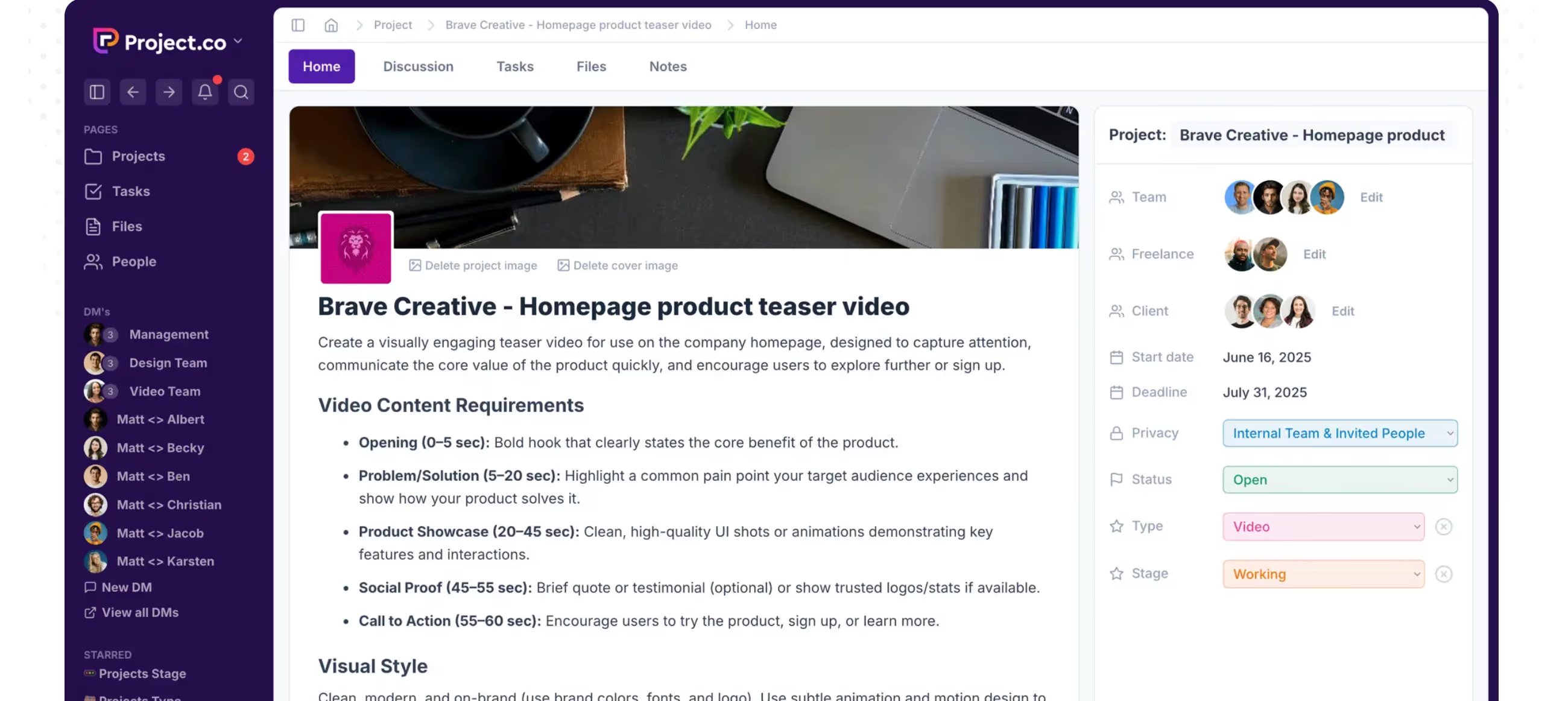
Every design decision in Project.co prioritizes the person who isn't a project management professional. When a client logs in, they see a clean dashboard with their projects. Open a project, and there's a discussion feed, task list, files section, and notes — all in plain language with intuitive navigation.
One user who tried "over 30 different softwares" describes showing Project.co to clients who said it's "simple and easy to navigate" — and calls that response "music to my UX design ears." The tool works because it doesn't ask clients to learn project management; it asks them to participate in a conversation about their work.
White-Label Everything
Custom branding, custom domain, custom sender email — on every plan. Your clients see your logo, your colors, your URL, and emails from your domain. This isn't a premium add-on or enterprise upsell; it's how the platform works by default.
For agencies where client perception matters, presenting a branded portal instead of a generic third-party tool elevates the professional experience. Clients feel like they're using your platform, not someone else's.
Flat-Rate Pricing That Makes Sense
Most PM tools charge per user, which creates anxiety every time you invite a client collaborator. Project.co charges flat monthly rates with team member caps but unlimited external participants. A 10-person agency on the Agency plan ($49/month) can invite every client, every freelancer, and every stakeholder without worrying about per-seat costs.
Compare that to Teamwork at $19.99/user × 10 = $200/month, or Monday.com at $12/user × 10 = $120/month. For teams that collaborate with many external people, the math favors Project.co significantly.
The Verdict: Our Assessment
7.4/10 — Project.co nails a specific problem: making clients actually use your project management tool instead of reverting to email. The white-label branding, simple interface, flat-rate pricing with unlimited clients, and founder-led support create a compelling package for freelancers and small agencies whose work revolves around client collaboration.
But it's a focused tool with clear boundaries. The absence of Gantt charts, API access, meaningful integrations, and advanced PM features means you're choosing client experience over project management depth. For teams where the client relationship is the project — social media managers, design consultants, marketing freelancers, small creative studios — that trade-off makes perfect sense. For teams managing complex, multi-phase projects with dependencies, resources, and reporting needs, Project.co will feel like a client portal that happens to have task management, not the other way around.
Criteria | Score | Verdict |
|---|---|---|
Client Experience | 10/10 | The simplest, most intuitive client-facing PM interface available — clients use it without training because it doesn't feel like a PM tool |
White-Label Branding | 10/10 | Custom domain, branding, and sender email on every plan — clients see your platform, not a third-party tool |
Value for Small Teams | 9/10 | Flat-rate pricing with unlimited clients and freelancers; Agency plan at $49/month for 10 users is hard to beat for client-heavy teams |
Support Quality | 9/10 | Founder-led support with remarkably fast response times — a genuine differentiator for a smaller platform |
Task Management | 6/10 | Covers the basics well — list, calendar, Kanban, recurring tasks — but lacks advanced dependencies, Gantt charts, and workload views |
Integrations | 3/10 | Limited to Google Drive, Dropbox, Zapier, Stripe, Google Calendar, Outlook — no API, no Slack, no CRM or accounting connections |
Scalability | 4/10 | Works beautifully for small teams with simple client work; breaks down as project complexity, team size, or integration needs grow |
⚠ Trade-offs: Maximum client experience and branding at the cost of PM depth, integrations, and scalability. Project.co is the best client portal that does project management, not the best PM tool that has a client portal.
Fit by Business Type
Strongest for client-facing freelancers and small agencies; weakest for internal teams and complex project operations.
Strong Fit
✔ Freelance consultants and solo service providers (9/10) — the Startup plan at $19/month gives you a branded client portal with unlimited projects and clients; looks professional without the overhead of enterprise tools.
✔ Small creative and marketing agencies (9/10) — the Agency plan at $49/month covers a 10-person team with unlimited client access; the white-label branding elevates how clients perceive your operation.
✔ Social media managers and content creators (8/10) — project-per-client structure with chat, files, and tasks fits the ongoing client service model perfectly.
Moderate Fit
◑ Web development agencies (5/10) — the collaboration features work for client communication, but complex build projects with dependencies and sprint-style development will strain the basic task management.
◑ Growing agencies 10-30 people (5/10) — Business plan at $99/month is affordable, but the lack of resource management, workload views, and advanced reporting becomes a real gap as the team scales.
Poor Fit
✗ Internal teams without client work (2/10) — the entire platform is designed around the client collaboration model; internal-only teams get a basic task manager at a premium for features they don't use.
✗ Enterprise and large teams (2/10) — no API, limited integrations, no compliance certifications, and feature gaps in reporting, dependencies, and resource management make it unsuitable for enterprise needs.
✗ Product and engineering teams (2/10) — no sprint planning, no backlog management, no dev-specific workflows, no version control integration; use purpose-built development tools instead.
What Users Say: Reviews & Verified Experiences
User ratings: 4.9/5 on Capterra (ease of use and customer service both 4.9), 4.82/5 on AppSumo (291 reviews). Smaller review volume than major PM platforms but exceptionally positive sentiment. The user base skews heavily toward marketing agencies, consultants, and freelancers — exactly the audience the tool was built for.
What Users Love
✩ Client simplicity: A marketing consultant who tried "over 30 different softwares" describes showing Project.co to clients who called it "simple and easy to navigate" — after previous tools generated complaints about being overwhelming (Capterra).
✩ Branded experience: A social media strategist says client onboarding "has never been so easy and professional" — the in-brand dashboards make it "look more professional" and clients "love how easy everything is" (Capterra).
✩ Single source of truth: A G2 user describes how "before, my workflow was scattered — tasks in spreadsheets, conversations buried in emails, files hidden across Google Drive." With Project.co, "every project now has a single source of truth" and "clients feel included" without lengthy update emails (G2).
✩ Founder-led support: Multiple reviewers highlight exceptionally responsive support, with one describing the founder as answering "even my slightest confusion" and guiding users thoroughly — unusual for any software company (Capterra, G2).
Common Complaints
⚠ Kanban limitations: A managing director notes the Kanban view requires scrolling each column individually, which "detracts from the big picture view it is supposed to offer" — a basic UX issue for a core view (Capterra).
⚠ Invoice constraints: Clients must be logged in to view invoices, meaning "it can't be paid by someone who's not involved in the project (like a finance department)" — a real friction point for B2B payments (Capterra).
⚠ Mobile app gaps: Multiple users note the iOS app "needs some attention to match what is available" on desktop — consistent with the desktop-first development approach of a lean team (Software Advice).
⚠ Feature depth limits: Some users find it "may not be suitable for businesses with complex or specialized project management needs" — the simplicity that attracts clients can frustrate power users who need more (Capterra, Software Advice).
What Project.co Users Typically Achieve
Clients Actually Participate
This is the core win. Users consistently describe the same transformation: clients who ignored invitations to other PM tools actively engage in Project.co because the interface doesn't intimidate them. Discussions happen in the project instead of over email.
Files get shared in the right folder instead of attached to scattered messages. Feedback lands on the relevant task instead of in a phone call you have to transcribe later. The reduction in "can you send me that again?" and "where did we leave off?" saves hours per client per month.
Your Brand Gets Stronger
When clients interact with a branded portal — your domain, your logo, your colors — the perception shifts from "my vendor uses some tool" to "my vendor has their own platform."
Multiple users describe the branding as elevating how clients perceive their professionalism and organization. For small agencies and freelancers competing against larger firms, this perception matters in client retention and referrals.
Communication Chaos Disappears
The project-level discussion feed replaces the multi-channel communication mess. Before: emails in your inbox, Slack messages in a channel, text messages on your phone, and meeting notes in a Google Doc.
After: one conversation thread per project where every stakeholder can see and contribute. Users describe "peace of mind" from knowing nothing is lost in an inbox and every project decision has a visible trail.
Where You'll Hit Ceilings
⚠ The feature ceiling hits when your projects get complex. Multiple phases with dependencies, resource allocation across projects, portfolio-level views, advanced reporting — Project.co doesn't have these. The integration ceiling hits when you need your PM tool to connect with your CRM, accounting software, or development tools beyond what Zapier can bridge. And the scale ceiling hits when your team grows past the point where simple task lists serve as adequate project management. For teams that hit these walls, Teamwork, Monday.com, or Asana offer the depth that Project.co deliberately doesn't.
💡 Set up your custom branding before inviting your first client — the branded experience is the strongest first impression. Create project templates for your most common engagement types so new client setup takes minutes, not hours.
Use the discussion feed as your primary client communication channel and actively redirect email conversations back into the project. And be honest about your project complexity: if you need Gantt charts, dependencies, or resource management, Project.co isn't trying to be that tool.
3 Critical Mistakes to Avoid
Mistake #1: Choosing Project.co for Complex Project Management
An agency managing large web development projects with multiple phases, dependencies, and resource constraints signs up for Project.co because the client portal looks great.
Two months in, they can't visualize timelines, can't track dependencies between deliverables, and can't see which team members are overloaded. The client communication is excellent, but the project management is falling apart because the tool wasn't designed for that level of complexity.
⚠ The Fix: Be honest about what you need. Project.co excels at client collaboration for straightforward deliverable-based work. If your projects involve complex scheduling, resource allocation, multi-level dependencies, or portfolio management, use a full PM platform (Teamwork, Monday.com, Asana) and accept the trade-off of a less intuitive client experience. Trying to force complex projects into a simple tool creates more chaos than it solves.
Mistake #2: Not Setting Up Branding Before Inviting Clients
A consultant invites their first client before configuring custom domain, branding, or sender email. The client receives an invitation from a generic Project.co email, logs into a platform with Project.co's default branding, and sees no connection to the consultant's business.
The "branded portal" advantage — the main reason to choose this tool over alternatives — is completely lost on the first and most important impression.
⚠ The Fix: Complete all branding configuration during the 14-day trial before any client invitation goes out. Set up your custom domain, upload your logo, configure brand colors, and set your custom sender email. Test the full experience by inviting yourself as a "client" to see exactly what they'll see. The white-label presentation is Project.co's biggest differentiator — skipping the setup undermines the reason you chose the tool.
Mistake #3: Relying on Project.co for Invoicing Without Testing the Workflow
A freelancer sends their first payment request through Project.co, expecting the client's finance department to process it. The finance team can't access the invoice without a Project.co login.
The client asks for a "normal invoice" via email. The freelancer ends up maintaining two billing systems — Project.co for some clients and a separate invoicing tool for others — doubling the administrative work instead of simplifying it.
⚠ The Fix: Test the payment workflow with your actual clients before committing to Project.co as your invoicing solution. If your clients' finance departments handle payments independently, the logged-in requirement will be a friction point. Consider using Project.co for project management and communication while maintaining a dedicated invoicing tool (like FreshBooks or Wave) that can send standalone invoices. The payment feature works best for freelancers billing individual decision-makers who are already in the project.
Frequently asked questions
Is Project.co free?
Not anymore. Project.co previously offered a free plan but has transitioned to a paid-only model with a 14-day free trial on all plans. The Startup plan begins at $19/month for up to 3 team members. Discounts are available for charities, non-profits, and educational organizations.
How does Project.co compare to Teamwork?
Teamwork is a full PM platform with advanced time tracking, billable rates, profitability reporting, workload management, and Gantt charts. Project.co is a client collaboration tool with simpler task management and a much more intuitive client experience. Choose Teamwork if you need deep financial tracking and resource management. Choose Project.co if your priority is making clients actually use the tool and your projects are straightforward.
Can I use my own branding and domain?
Yes, on every plan. Custom branding (logo, colors), custom domain, and custom sender email are included at no extra cost. Clients see your brand throughout the experience — from email invitations to the login page to the project dashboard. This white-label capability is available even on the $19/month Startup plan.
Does Project.co have an API?
No. Project.co does not currently offer an API. Integrations are limited to Google Drive, Dropbox, Zapier, Stripe, Google Calendar, and Microsoft Outlook. If you need custom integrations, automated workflows, or connections to CRM or accounting tools, you'll need to work through Zapier or consider a platform with native API access.
Is Project.co suitable for large teams?
Project.co scales to 100 team members on the Enterprise plan ($299/month) but is best suited for smaller teams managing straightforward client work. Larger teams typically need advanced resource management, portfolio reporting, complex dependencies, and deep integrations that Project.co doesn't offer. Teams above 15-20 people managing complex projects will likely outgrow the platform.
What security measures does Project.co have?
Data is encrypted in transit via HTTPS and hosted on AWS servers in the United States. Role-based permissions control what clients can see vs. what remains internal. Google SSO is available for login security, with two-factor authentication on the roadmap. The platform maintains 99.9%+ uptime with 24/7 monitoring. No enterprise compliance certifications (SOC 2, HIPAA) are listed.