Know who’s about to leave. Before the renewal call.
Every account shows its MRR, its renewal and why it may be at risk: what its people said, how many tickets they opened and whether they still use the product.
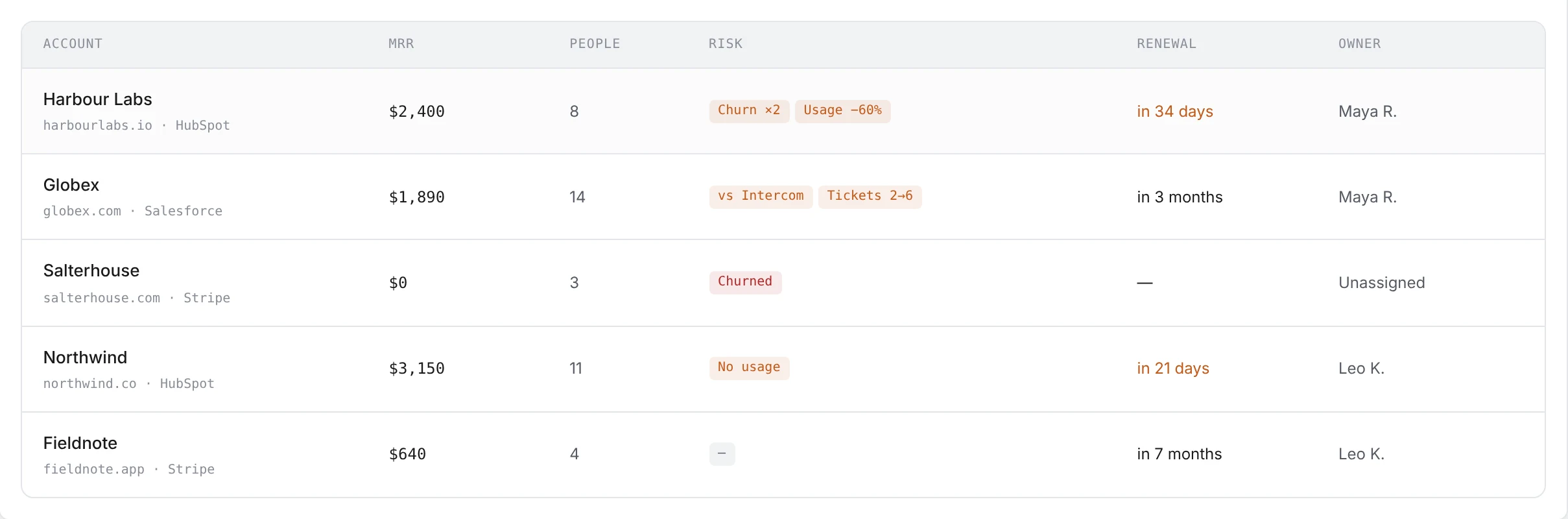
Why an account needs a look, in two words.
Open churn signals from its people. A competitor they compared you to unfavourably. Support tickets that doubled this month. Usage that halved, or stopped. Each shows as a short reason on the account, so a weekly pass over your book takes minutes.
Followed up? Acknowledge it and the reason clears, until something new comes in.
See your accounts at risk →The quiet ones are the ones who leave.
Most customers who churn never complain. With Pulse installed, you see who stopped logging in, who never got past setup and whose usage is dropping against their own normal, all on the same person and account as their feedback.
See who’s slipping →Walk into the QBR with what you shipped for them.
Show the customer you listened before they ask. Every account lists what its people asked for and where each request stands: delivered, in progress, planned, or not yet planned. Pick a date, like your last review, and copy a short brief for the meeting or an email to the customer.
Prepare a renewal →Reach out with something to say, not “just checking in”.
Email one person, a whole account, or a Pulse list, from your own mailbox. The AI writes from what that person actually told you, and you approve it before it goes.
Or let Rules do it: check in when an account turns at risk, ask churned customers why they left, tell people their request shipped.
See the rules →Your accounts at risk, in your inbox.
Turn on the weekly email and each Monday you get the accounts you own that need a look, with the reason for each. Nobody has to remember to open a dashboard.
Get the Monday email →Revenue in, risk back out.
MRR, plan, owner, renewal and deals come in from HubSpot, Salesforce or Attio, and revenue from Stripe. Churn risk, requests and what shipped go back to the CRM, so the account owner sees it where they already work.
Connect your CRM →Tell product what it’s costing you.
Every churn signal and request lands on a Workbench card with the MRR and churned revenue behind it, so the fix that saves your renewals moves up the roadmap.
Questions & answers
What makes an account “at risk”?
Any of these: open churn signals from its people that nobody has followed up, an unfavorable comparison with a competitor in the last 90 days, support tickets that at least doubled against the 30 days before, or, with Pulse, usage that halved or stopped. Accounts that cancelled in the last 90 days show as Churned.
Where does MRR and renewal come from?
From the CRM you connect (HubSpot, Salesforce or Attio) and from Stripe. Accounts are built from your people’s email domains, so feedback, usage and revenue meet on the same company.
Do I need Pulse for this?
No. Churn signals, competitor mentions and tickets work from your feedback alone. Pulse adds the usage reasons and the slipping lists, which catch the customers who go quiet without complaining.
Can I see only my accounts?
Yes. Switch the list to Mine to see the accounts you own here or in your CRM, or to Unassigned to find the ones nobody owns yet.
Will emails go out without me seeing them?
Not unless you allow it. Emails written by rules wait for your approval by default, and send from your own mailbox, never to anyone who unsubscribed.
Connect your revenue. See who’s at risk today.
Connect your CRM or Stripe and a feedback source, and your accounts at risk show up on their own. Free plan included — no credit card.