A freelance web designer quoted a client $3,500 for a portfolio site. Hosting? She picked the cheapest option she could find—$2.49/month, 48-month commitment. The site launched fine. Six months later, the client called: pages were taking 4+ seconds to load, contact form submissions were timing out, and a competitor with a faster site was winning the same leads. The designer migrated to a $14/month host, load times dropped to 1.1 seconds, and the form started working again. Total cost of the "cheap" hosting experiment: $2.49/month plus a strained client relationship and six months of lost leads.
The advertised price is almost never what you'll actually pay.
That's what most "cheap hosting" listicles won't tell you. This guide takes a different approach. Instead of ranking hosts by their flashiest introductory deal, we're breaking down the total cost of ownership—what you'll really spend over 12, 24, and 36 months when you factor in domain renewals, SSL, email hosting, backups, and all those "optional" add-ons that suddenly feel very non-optional once your site is live.
For a broader comparison of all hosting tiers (not just budget), check out our full guide: Best Website Hosting Services in 2026. And if you want to compare providers side-by-side based on your specific needs, head to our Hosting Platforms comparison page.
Let's dig into the numbers.
Budget Hosting
Cost Calculator
Compare the real cost of hosting — not just the advertised price. Adjust your timeline, team size, and budget tier.
The Price You See vs. The Price You Pay
Before we compare any specific hosts, you need to understand the gap between marketing prices and real-world costs. Here's what typically gets buried:
Domain registration and renewal. That "free domain" for year one? It renews at $15–$20/year. Some hosts charge transfer fees or make moving your domain unnecessarily painful. Always check the renewal rate before signing up.
SSL certificates. Most hosts include free Let's Encrypt SSL now, which is perfectly fine for the vast majority of sites. But some budget providers push premium certificates at $50–$100/year by making the free option hard to find. For most small businesses and blogs, the free SSL is all you need.
Email hosting. This is the hidden cost that catches the most people off guard. Kinsta and Cloudways don't include email hosting at all—you'll need Google Workspace ($7/user/month) or similar. HostArmada and Hostinger bundle it in. If you have a team of five needing professional email addresses, that's potentially $420/year that wasn't in the sticker price.
Backup services. Free daily backups should be standard in 2026. SiteGround and HostArmada include them across all plans. Bluehost only includes them on mid-tier plans. If your host doesn't automate backups, budget $2–$5/month extra for a third-party solution.
Renewal rate shock. Hostinger's plans can jump nearly 4x at renewal. Bluehost roughly 2.5x. SiteGround's renewals are notoriously steep—$3.99/month becomes $17.99. The cheapest deal only stays cheap if you commit to a long initial term or migrate before renewal hits.
The real comparison isn't monthly price. It's total cost over 24–36 months, including everything your business actually needs to operate.
What You Actually Get at Each Price Point
Tier 1: Under $5/Month — Good Enough to Start, Not Enough to Stay
This is introductory-deal territory. You can genuinely get functional hosting under $5/month—but you're trading performance, support, and features for that price tag.
Who it actually works for: Personal blogs, portfolio sites, landing pages, side projects, and anyone testing a business idea before committing real capital.
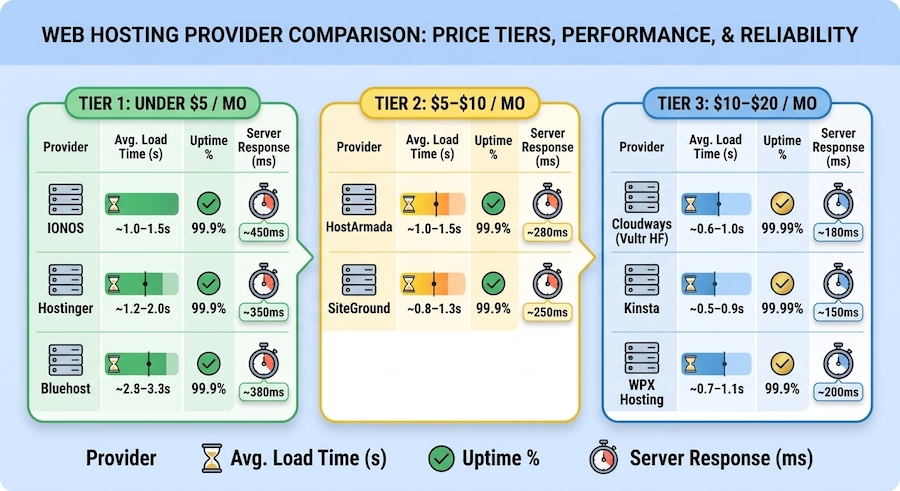
Hostinger starts at roughly $2.99/month on their Premium shared plan (48-month commitment for the lowest price). You get up to 100 websites, 100GB SSD storage, free SSL, free domain year one, and weekly backups. Sites typically load in the 1.2–2 second range. The catch: renews at roughly $7.99/month, and you're locked into that long term. Support is chat-only with variable response times.
Bluehost offers their Basic plan around $2.95/month (36-month term). One website, 10GB SSD storage, free SSL, free domain year one, and free Cloudflare CDN. WordPress.org officially recommends it for beginners, and the one-click setup is genuinely painless. But 10GB is tight for image-heavy sites, backups aren't included on basic (that's an upsell), and renewal jumps to roughly $11.99/month.
IONOS is the budget dark horse at just $1/month first year. Free SSL, domain, decent performance, and a surprisingly useful AI website builder. Renewal prices are more reasonable than competitors. The control panel is less intuitive, though, and advanced WordPress features are limited on entry plans.
What you give up: automatic daily backups, priority support (expect 15–60 minute chat queues), multiple server locations, staging environments, and advanced security features.
Real cost over 24 months (single site): That "$2.99/month" host, once you add domain renewal, email hosting (Google Workspace for one user), and a backup plugin? Approximately $365 total—about $15.21/month. Five times the sticker price.
Tier 2: $5–$10/Month — The Biggest Value Jump Per Dollar
This is where we see the most dramatic improvement in what you actually get. You're still firmly in "budget" territory, but the performance, support, and included features take a meaningful step forward.
Who it works for: Active small business sites, growing blogs with real traffic, freelancer portfolios that need to impress clients, small ecommerce stores, and anyone who can't afford downtime costing them revenue.
SiteGround GrowBig runs about $6.99/month intro (12-month term). Unlimited websites, 20GB SSD storage, free daily backups, free email, staging environments, Ultrafast PHP, and some of the best customer support in the industry. The reality check: renewal jumps to $24.99/month—one of the steepest increases in the market. But during that first year, the value is hard to beat.
HostArmada Web Warp sits around $4.69/month (36-month term). Unlimited websites, 30GB SSD storage, free daily backups, free SSL and domain, LiteSpeed servers (genuinely faster for WordPress), and unlimited email accounts. HostArmada keeps surprising people—performance competes with hosts charging two to three times as much. Support is skilled and available 24/7. Renewals land around $7.69/month, which is one of the most reasonable bumps in budget hosting. This is the provider that generates the most enthusiastic feedback at this tier.
Hosting.com offers Turbo servers promising up to 20x faster page loads. NVMe storage, LiteSpeed servers, proprietary caching. Benchmarks back up most speed claims. The caveat: support quality has been inconsistent, and the sheer number of plan options can be confusing.
Real cost over 24 months (single site): Using a host at $6.99/month with email and backups included? Approximately $401—about $16.71/month. Nearly identical to Tier 1's real cost, but with significantly better performance, support, and features bundled in. That's the pattern worth noticing.
Tier 3: $10–$20/Month — Where Hosting Stops Being a Compromise
At this price point, you're entering managed and cloud hosting territory. The provider handles more technical work, and the infrastructure is fundamentally different from shared servers.
Who it works for: Businesses generating revenue from their website, ecommerce stores where load time directly impacts conversions, content sites with 50,000+ monthly visitors, and anyone whose website IS their business.
Cloudways starts at $14/month for DigitalOcean (monthly billing, no long-term commitment—refreshing). Choose your cloud provider, get dedicated resources, free SSL, built-in CDN, automated backups, and staging. The Vultr High Frequency plan at around $16/month is extremely popular in hosting communities for speed. The learning curve: custom dashboard instead of cPanel (takes a day to adjust). Email costs $1/email/month extra. No phone support.
WPX Hosting starts around $20.83/month annually. Up to 5 websites, 15GB storage, their own CDN (not resold), free malware scanning and removal, and support averaging under 30 seconds response time. Their "Fix for You" guarantee means they handle technical issues on your behalf. Purpose-built for WordPress, and benchmarks prove it. The trade-off: storage feels tight at 15GB, no cPanel, and pricing is steep if you only have one site.
Kinsta enters at $35/month for a single site—pushing the upper boundary. But the infrastructure is in a different class: Google Cloud Platform C3D VMs, Cloudflare Enterprise CDN, containerized sites where your performance is never affected by "server neighbors." Support is excellent, and their MyKinsta dashboard is one of the industry's best. No email hosting (budget for Google Workspace), and costs scale quickly with multiple sites.
Real cost over 24 months (single site): Cloudways at $14/month with Google Workspace runs approximately $538—about $22.42/month. Higher than other tiers, but no renewal shock, fundamentally better performance, and if your site generates revenue, the ROI math changes completely.
The Price vs. Performance Reality Check
Average page load times by tier (WordPress site with standard theme, ~2MB page weight):
Bubble size reflects server response time (smaller = faster TTFB). Lower-right quadrant = best value zone.
Performance data aggregated from independent testing by WebsitePlanet, Cybernews, GTmetrix community benchmarks, and user-reported results across hosting forums. Individual results will vary based on site optimization, location, and traffic.
The takeaway: there IS a meaningful performance difference between tiers, particularly in server response times. The jump from Tier 1 to Tier 2 gives you the biggest bang for your buck. Moving from Tier 2 to Tier 3 delivers noticeable improvements, but the gap is smaller.
Why this matters for your bottom line: Google's Core Web Vitals directly impact search rankings. A site that loads in 1 second versus 3 seconds can see meaningfully better search performance. For ecommerce, studies consistently show each additional second of load time can reduce conversions by 7% or more. If your site generates $5,000/month in revenue, a 1-second improvement that boosts conversions by even 5% is worth $250/month—far more than the difference between hosting tiers.
When Cheap Makes Sense (And When It's the Expensive Choice)
Budget hosting under $5/month is the right call when you're launching a personal blog, testing a business idea, running an informational site without transactions, getting fewer than 5,000 monthly visitors, and you're comfortable handling your own troubleshooting.
Spend $5–$10/month when your site actively represents your business to clients, you're running WordPress with multiple plugins, you need reliable bundled email hosting, downtime during business hours costs you opportunities, and support quality actually matters to you.
Invest $10–$20/month when your website generates consistent revenue, you're getting 50,000+ monthly visitors, page speed directly impacts conversions, you handle payment data or sensitive information, and you'd rather your host solve technical problems than burn your own time on server management.
The ROI Math That Changes Everything
This is where the "cheap at any cost" mindset breaks down. Let's run the numbers.
A freelance consultant with a portfolio and booking site generating $3,000/month from website leads. Estimated conversions lost from slow loading (3+ seconds): 5–8%, or $150–$240/month at risk. Cost difference between Tier 1 and Tier 2: about $5/month. Even a 2% conversion improvement pays for the upgrade 10x over.
A small ecommerce store doing $10,000/month. Estimated conversion impact of 1-second faster load time: 5–7%, recovering $500–$700/month. Cost difference between Tier 1 and Tier 3: about $15/month. That's a 33x–47x return on the hosting investment.
A content/affiliate blog earning $800/month in ad revenue. Better Core Web Vitals could drive 10–15% more organic traffic—$80–$120/month in additional revenue. Cost difference between Tier 1 and Tier 2: about $5/month. 16x–24x return.
The pattern is clear: for any site that generates revenue—even modest revenue—the cheapest hosting is rarely the most cost-effective hosting.
What Users Actually Say
On Hostinger: Users consistently praise the initial pricing and feature breadth. The AI website builder adds genuine value for beginners. The most common complaint: support lag during peak hours and surprise at renewal increases. Recurring theme from WordPress forums: the LiteSpeed servers deliver noticeably better performance than the price suggests.
On HostArmada: This provider generates some of the most enthusiastic budget-tier feedback we've seen. Users frequently compare it favorably against hosts costing two to three times as much, with particular praise for support knowledge and friendliness. Common sentiment: "I was paying more for worse service at SiteGround." LiteSpeed servers, free daily backups, and included malware scanning create a package that feels more premium than the price indicates.
On SiteGround: Almost universally praised for performance and support during the initial discounted period. Equally universal frustration at renewal. Users who stay accept they're paying a premium for genuinely top-tier support. Users who leave typically migrate to HostArmada or Cloudways for better long-term cost structure.
On Cloudways: Users migrating from shared hosting consistently report meaningful speed improvements—the kind that show up in real analytics, not just speed test tools. Monthly billing with no renewal shock is frequently cited as a major plus. The gaps: no bundled email hosting and a learning curve on the custom dashboard are the two most common friction points.
Money-Back Guarantees: Who Puts Their Money Where Their Mouth Is
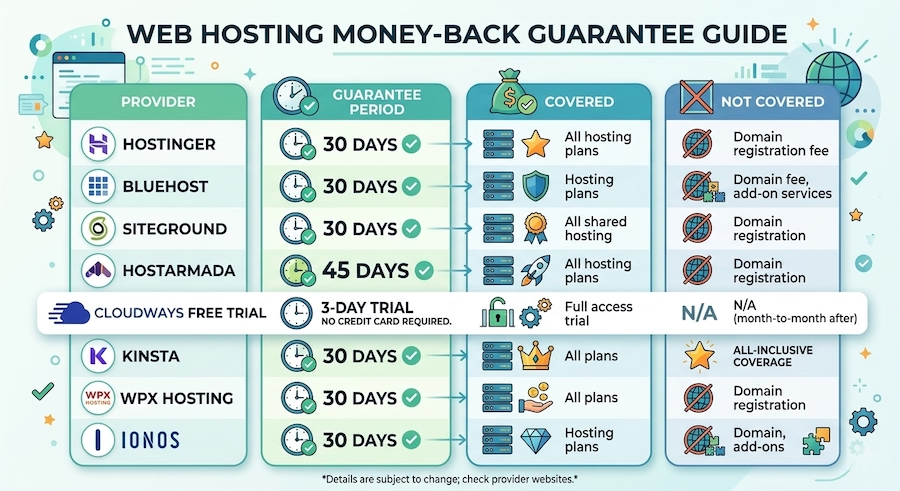
HostArmada's 45-day guarantee stands out—the longest in budget hosting and a real signal of product confidence. Cloudways takes a different approach: no-credit-card trial so you test the actual product before spending anything. Both are genuinely pro-consumer.
Migration: The Hidden Cost Nobody Mentions
Switching hosts isn't just about the new provider's price. It's about what it costs to get there.
Free migration included: Hostinger, SiteGround (WordPress Migrator plugin), HostArmada (expert migration), Cloudways (team migration), Kinsta (expert migration—one of the best), WPX Hosting, and Bluehost (within first 30 days).
"Free migration" means wildly different things depending on the provider. Some hand you a plugin and wish you luck. Others have actual engineers who handle the entire process, test everything, and ensure zero downtime. Kinsta and WPX fall into the latter category. HostArmada is also known for hands-on support during migrations.
DIY migration typically takes 2–6 hours for a WordPress site, with 24–48 hours of DNS propagation, potential plugin compatibility issues, and email migration headaches. But here's the thing: if migration complexity is what's keeping you on an overpriced host, don't let it. The providers in the $5+ tiers almost universally offer free expert migration. The cost of staying on a bad host is almost always higher than the hassle of switching.
The Full Price Comparison
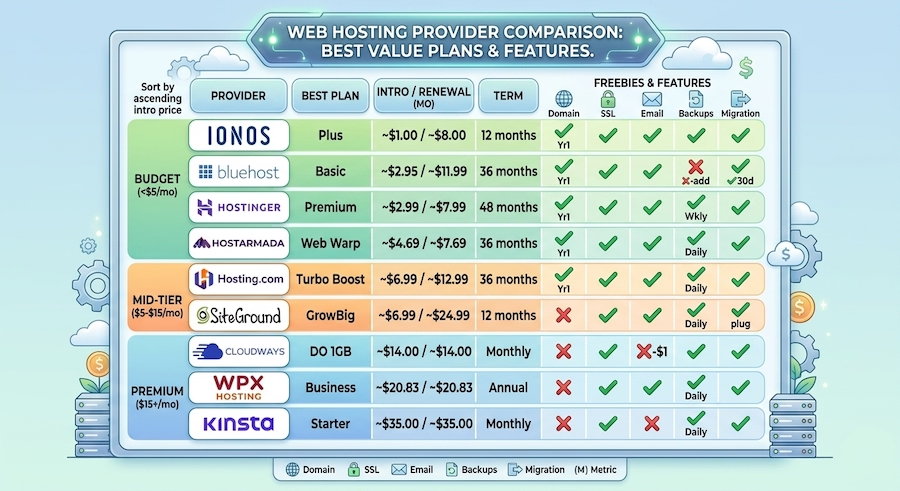
Prices approximate based on publicly available data as of March 2026. Promotional rates require the minimum term commitment listed. Always verify current pricing directly with the provider.
The pattern worth noting: hosts with the lowest introductory prices tend to have the steepest renewal increases. Hosts with higher consistent pricing—Cloudways, WPX, Kinsta—charge the same rate month after month. No surprises, no "gotcha" renewal emails.
So What Should You Actually Pick?
Testing a business idea or starting a personal blog? Hostinger or IONOS. Minimal investment to get live. Just know the renewal rate and plan accordingly—budget for the increase or plan to migrate before it hits.
Running an active small business site? HostArmada is the best value in budget hosting right now. LiteSpeed performance, included email and backups, strong support, and reasonable renewals make it the most honest deal in the space. SiteGround is excellent if you can stomach the renewal for top-tier support.
Your website generates revenue and reliability is non-negotiable? Cloudways for the best balance of performance, flexibility, and predictable pricing. WPX Hosting if you want a WordPress-focused provider that handles more of the technical work. Kinsta if your budget allows the best infrastructure and support available.
Compare all these providers head-to-head based on your specific needs with Find Software.
Here's the uncomfortable truth about cheap hosting: the cheapest option and the most cost-effective option are almost never the same thing. The difference between a $3/month host and a $7/month host is $48/year. The difference in performance, support, and included features can be worth thousands in saved time, recovered revenue, and avoided headaches. Spend based on what your site needs to do for your business—not on what the intro price looks like in a banner ad.