Everyone loves free. And when you're launching your first website — whether it's a portfolio, a side project, or a business idea you're not sure will work yet — dropping $0 on hosting feels like the smartest move you can make.
Until it isn't.
The $4,800 Free Lunch
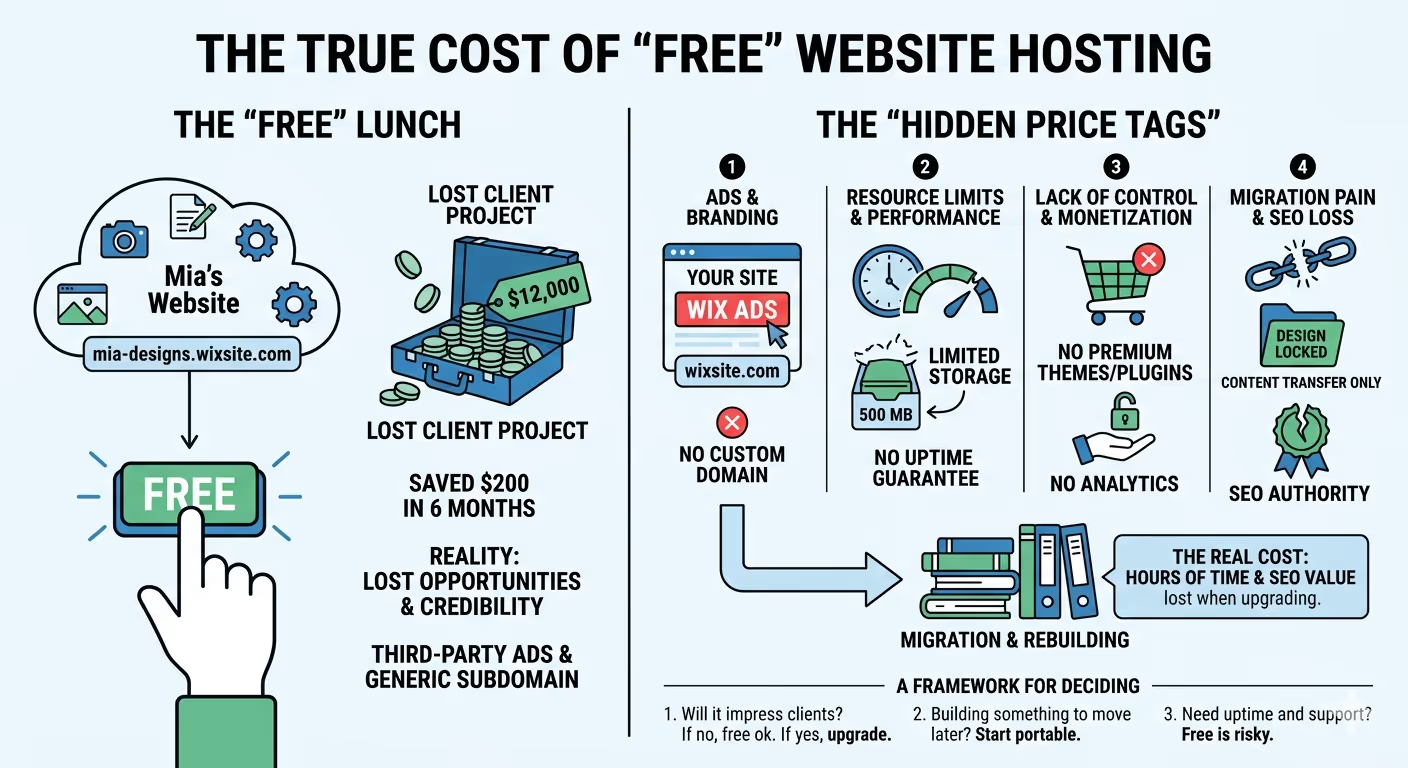
A freelance designer — let's call her Mia — launches her portfolio on a free website builder. She picks Wix's free plan because it's fast, the templates look great, and she figures she'll upgrade "when the money starts coming in."
Six months later, Mia has 40 portfolio pieces uploaded, a decent trickle of traffic, and a potential client who wants to hire her for a $12,000 rebrand project. The client visits her site. The URL reads mia-designs.wixsite.com/portfolio. There's a Wix ad banner at the top. The client doesn't say anything about it, but the contract goes to someone else.
Mia doesn't know why she lost the job. But we've watched this pattern enough to know: the URL alone probably cost her $12,000. The hosting saved her roughly $200 over those six months.
That's not an argument against free hosting. It's an argument for understanding exactly what free hosting gives you — and where the invisible price tags are hiding.
What "Free" Actually Means in Hosting
Before we break down specific providers, you need to understand the business model behind free hosting. Nobody runs servers out of charity. Every free host monetizes you in one of four ways: they show ads on your site, they use your site as a lead funnel to upsell paid plans, they collect and leverage your data, or they severely limit resources to keep costs near zero.
Sometimes it's all four at once.
This isn't inherently evil — it's just the deal. The problem is that most people don't read the terms until something breaks. So let's lay out what "free" looks like across the spectrum, from developer-focused platforms to drag-and-drop builders.
The Free Hosting Landscape: 9 Options, Honest Breakdown
The Developer-Grade Free Tiers (Actually Good)
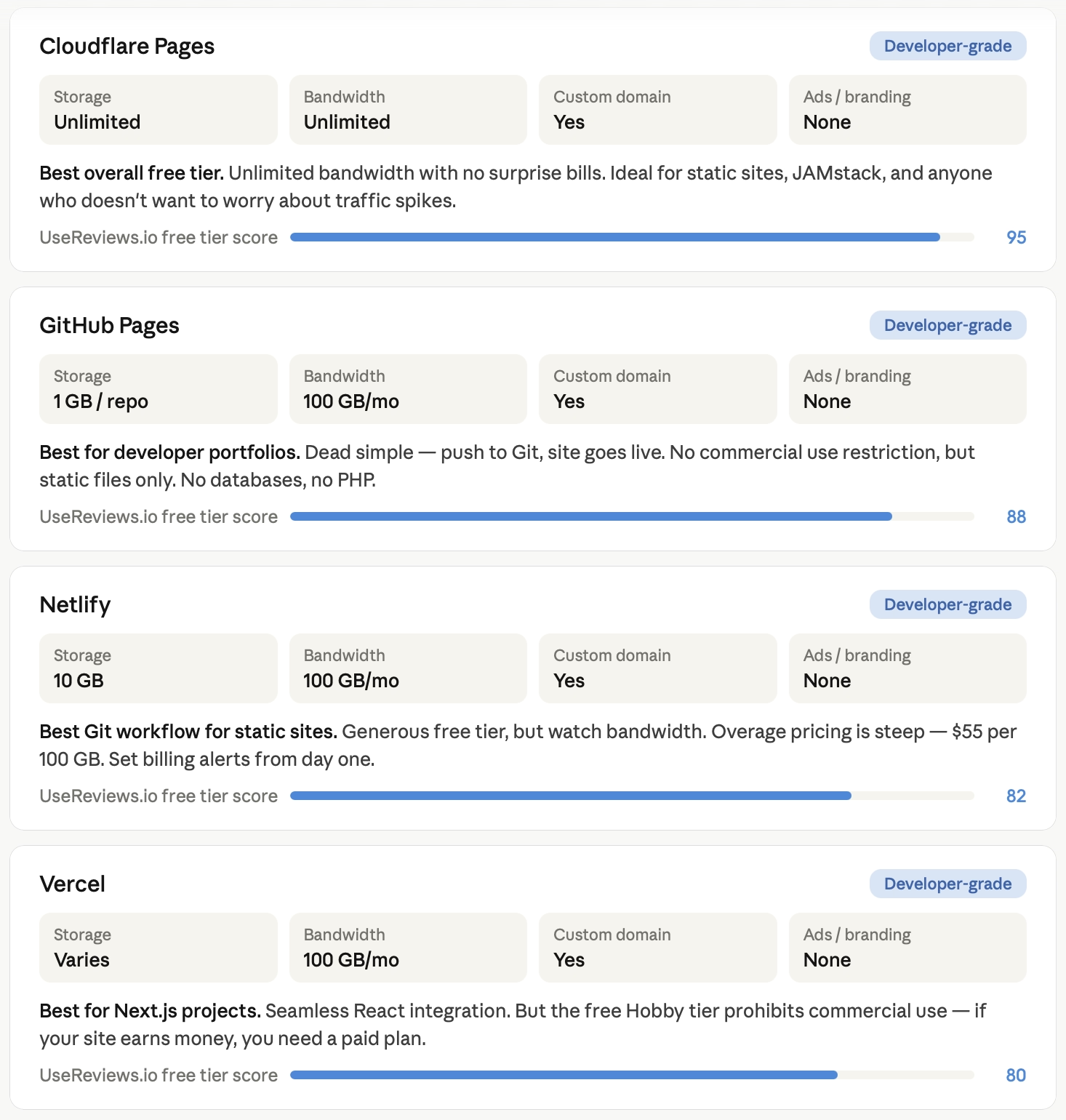
GitHub Pages is the quiet powerhouse that most non-developers overlook. It's a static site hosting service built directly into GitHub — push your code to a repository, and your site goes live. You get 1 GB of storage per repository, 100 GB of monthly bandwidth, free SSL, and the ability to connect a custom domain you already own. No ads, no branding, no catch.
The limitation is right there in the name: static sites only. No server-side code, no databases, no PHP, no WordPress. If your site is HTML, CSS, and JavaScript — a portfolio, documentation, a landing page, a blog built with a static site generator like Hugo or Jekyll — GitHub Pages is legitimately production-quality hosting for $0.
Who it works for: Developers, designers with coding skills, open-source project documentation, and anyone comfortable with Git. If you know what a commit is, this is probably the best free hosting available in 2026.
Who it doesn't work for: Anyone who needs a CMS, a contact form with a database, or a site that does anything dynamic on the server side.
Cloudflare Pages takes GitHub Pages' approach and removes some of the ceilings. You get unlimited bandwidth on the free tier — not a soft cap, genuinely unlimited — along with unlimited sites, 500 builds per month, and deployment from Git.
Cloudflare's global network (300+ data centers) means your static site loads fast virtually everywhere. Free SSL, custom domains, all included.
The free tier also includes limited access to Cloudflare Workers (serverless functions), giving you 100,000 requests per day with a 10ms CPU time limit per request. That's enough for light API proxies, redirects, or simple form handlers — stretching "static hosting" further than most competitors.
The real advantage: If your bandwidth spikes because a blog post goes viral, Cloudflare doesn't send you a surprise bill. They just serve the traffic. Contrast that with Netlify, where exceeding the 100 GB monthly cap on the free tier has resulted in some genuinely alarming overage charges — one widely-reported case reached six figures for a simple static site.
Netlify pioneered the Git-connected deployment workflow and remains a strong option for developers. The free Starter plan includes 100 GB bandwidth, 300 build minutes, 125,000 serverless function invocations, and 1 million edge function requests per month. You also get unlimited deploy previews, custom domains with SSL, and a global CDN.
The caveat: Netlify's free tier has gotten less generous relative to the competition. With average web pages now weighing around 2.5 MB, that 100 GB bandwidth supports roughly 40,000 page views before you need to start worrying.
And Netlify's overage pricing — $55 per additional 100 GB — is steep enough that several high-profile developers have publicly migrated to Cloudflare Pages specifically because of surprise bills. If you're deploying a personal project or low-traffic site, Netlify is still excellent. Just set up billing alerts from day one.
Vercel is the canonical platform for Next.js projects. The free Hobby tier offers 100 GB bandwidth, 100 functions per deployment, and 1,000 hours of function execution per month. It's designed for personal and hobby projects — important distinction — because Vercel's free tier explicitly prohibits commercial use. If your site generates revenue, you need a paid plan.
The Website Builder Free Tiers (Fine for Learning, Risky for Business)
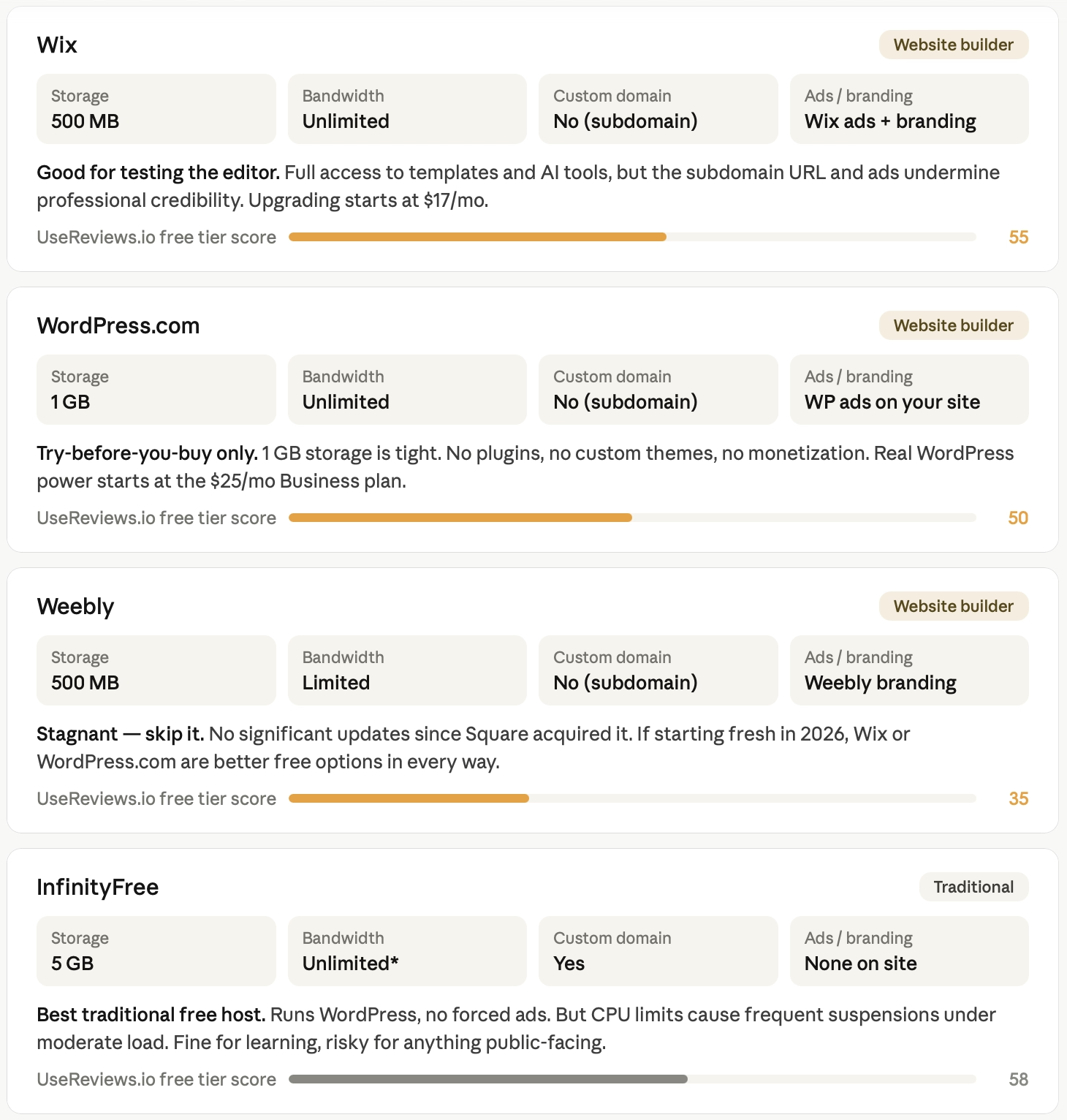
Wix Free Plan gives you access to the same Harmony editor and 800+ templates as paying customers, plus basic storage and unlimited visitor bandwidth. You also get access to Wix's AI creation tools. Sounds great on paper. (If you're evaluating Wix against more code-oriented builders, our Webflow review covers a very different approach — visual design that outputs real code.)
Here's what's not on paper until you've already built your site: your URL will be accountname.wixsite.com/siteaddress (no custom domain), Wix displays its own ads on every page, storage is limited to around 500 MB, you can't sell anything online, and you have no access to analytics. You also can't remove the Wix branding or connect Google Analytics.
The free plan is designed as a try-before-you-buy experience, and it's genuinely useful as one. Build your site, test the editor, get comfortable with the platform. But publishing a client-facing or business site on the free plan is a credibility problem. Upgrading starts at $17/month for the Light plan (which finally removes ads and lets you use a custom domain).
WordPress.com Free Tier gives you access to WordPress's block editor with a yoursite.wordpress.com subdomain. You get 1 GB of storage — tight for anything media-heavy — and WordPress.com displays its own ads on your site that you can't control or remove. No custom domain, no plugin installation, no premium themes, no monetization options, and no access to premium support.
The free tier is useful for exactly one thing: testing whether you like the WordPress editing experience before committing money. For an actual blog, portfolio, or business site, the Personal plan at $4/month removes ads and unlocks a custom domain.
The real WordPress power (plugins, custom themes, advanced SEO) doesn't arrive until the Business plan at $25/month — at which point you might want to consider self-hosted WordPress.org with cheap shared hosting instead. (If publishing and newsletters are your primary focus, Ghost is worth a look — it's purpose-built for content creators and takes 0% of your subscription revenue.)
Weebly Free Tier still exists, though the platform has been in maintenance mode since Square acquired it. You get a Weebly-branded subdomain, basic templates, and limited storage. The platform has supported over 40 million websites historically, but development has stagnated — no significant feature updates in years. If you're starting fresh in 2026, there's little reason to choose Weebly over Wix or WordPress.com, even on the free tier.
The Traditional Free Hosting Providers (Proceed with Caution)
InfinityFree is one of the most generous traditional free hosts on paper. You get 5 GB of disk space, free SSL through Cloudflare, no forced advertising on your site, support for PHP and MySQL (meaning you can run WordPress), and the ability to connect a custom domain. They even include a Softaculous auto-installer for 400+ scripts and a Site.pro website builder.
The catch is performance. Free accounts sit on heavily overloaded shared servers, and CPU usage limits trigger frequently. Run more than a handful of WordPress plugins and your site will periodically get suspended until the next hour.
InfinityFree is transparent about this — they fund free hosting through ads on their own site and control panel, not on yours — but the practical experience is a site that loads slowly and occasionally goes dark under even moderate traffic.
Best use case: Learning web development with real hosting. Testing PHP applications. Hobby projects where occasional downtime doesn't matter.
AwardSpace has been offering free hosting since 2004 and provides a functional (if limited) free tier. However, it comes with no uptime guarantee on the free plan — meaning your site might be down and you have no recourse. For anything beyond experimentation, this is a dealbreaker.
The Insight Most "Free Hosting" Guides Miss
Here's what we've noticed after reviewing hundreds of hosting setups at UseReviews.io: the biggest cost of free hosting isn't the hosting itself. It's the migration.
People build on free platforms because they're easy. They add content, customize designs, configure settings, build SEO authority on their subdomain URLs. Then, six or eighteen months later, they realize they need to move. And that's when they discover that:
Wix doesn't let you export your site design — just raw content. WordPress.com locks you out of plugins that would make migration easier until you're on the Business plan.
Website builders use proprietary formatting that doesn't transfer to other platforms. Even GitHub Pages is straightforward to migrate from (it's just files), but if you've built a workflow around GitHub Actions and specific build tools, reconfiguring elsewhere takes time. (And if you're building a complex content architecture that demands enterprise-grade flexibility from the start, Drupal solves the portability problem differently — but the learning curve is steep.)
The migration isn't just inconvenient — it's expensive. You lose SEO authority built on subdomain URLs. You spend hours (or pay someone hundreds of dollars) to rebuild what you had. And in the worst cases, you discover that the free platform technically owns certain rights to content hosted on its servers.
The real question isn't "Is free hosting good enough?" It's: "If I need to leave, how painful will that be?"
The platforms that score best on this dimension are the ones that use standard, portable formats. GitHub Pages and Cloudflare Pages score perfectly — your content is just files in a Git repo. Netlify and Vercel score well for similar reasons. WordPress.com at least has a content export feature, even if the design doesn't come with it. Wix and Weebly score worst because your design, layout, and functionality are locked inside their proprietary systems.
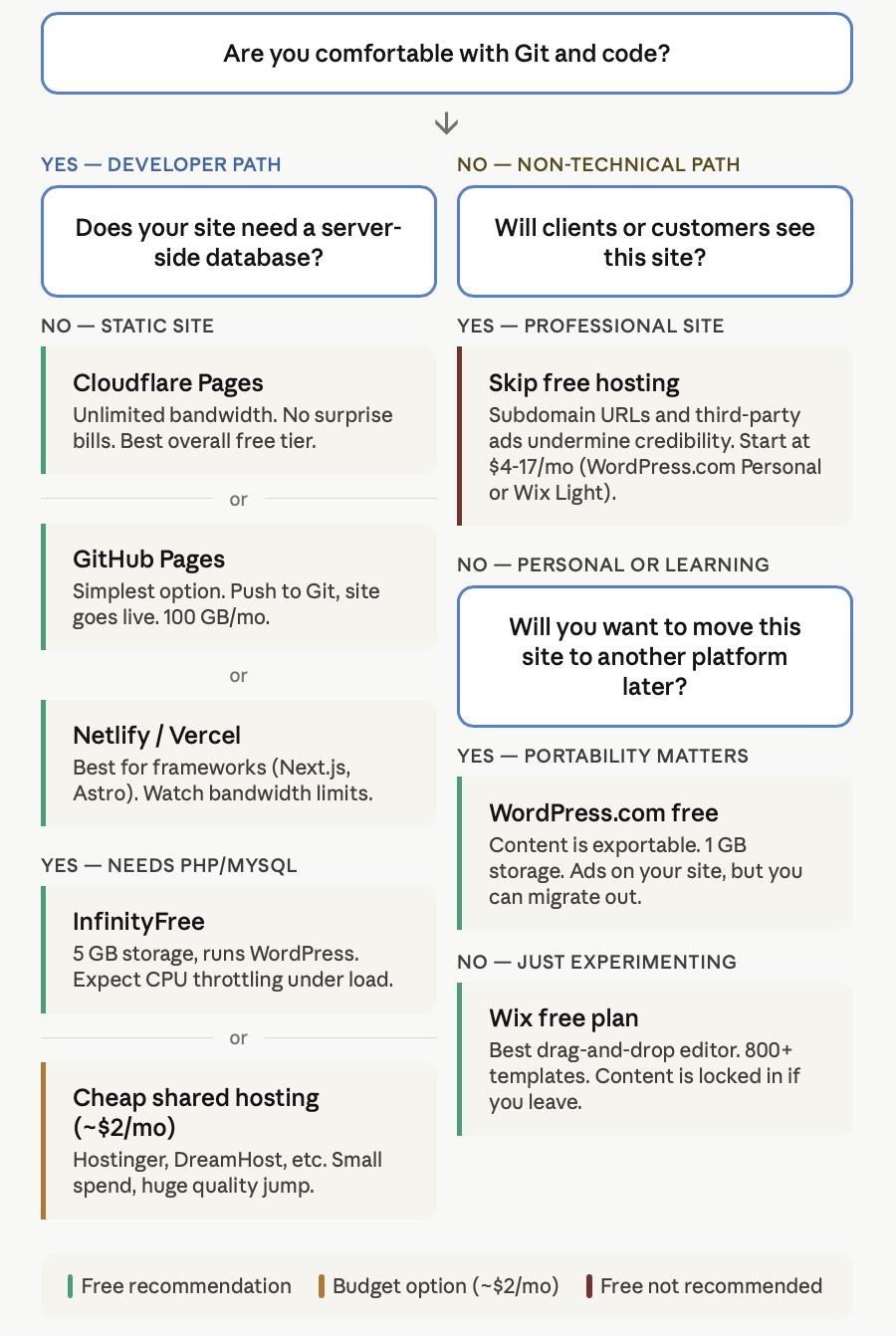
A Framework for Deciding: Three Questions
Rather than giving you a generic "it depends" answer, here's the decision framework we use internally when someone asks us whether free hosting is right for their situation.
Question 1: Will anyone you want to impress ever see this site?
If the site is purely personal — a learning project, a private hobby blog, a test environment — free hosting is perfectly fine. Use whatever platform makes you happy. But if a potential client, employer, investor, or customer will see this site, the subdomain URL and third-party ads are liabilities. A .com domain costs $10-15/year. The cheapest paid hosting starts under $2/month. The professional credibility gap between yourname.github.io and yourname.wixsite.com/site is real.
Question 2: Are you building something you'll want to move later?
If yes, start on a platform with portable content from day one. GitHub Pages, Cloudflare Pages, or self-hosted WordPress on cheap shared hosting. If you build 50 pages on Wix's free plan and then realize you need to move, you're rebuilding from scratch.
Question 3: Can your project survive downtime?
Free hosting comes with no SLAs. No guaranteed uptime, no priority support, no one to call at 2 AM when your site goes down. If downtime means lost revenue or damaged trust, free hosting is the wrong choice regardless of how good the free tier looks on paper.
When Free Hosting Is the Right Call
We're not here to scare you away from free hosting. For the right situations, $0 is exactly the right price:
Learning and experimentation. InfinityFree or GitHub Pages give you a real environment to practice HTML, CSS, PHP, or static site generators. Break things. Try stuff. That's what free tiers are for.
Developer portfolios and documentation. GitHub Pages or Cloudflare Pages are genuinely production-quality for static sites. No asterisks. If you're a developer, host your portfolio there and feel good about it.
MVPs and rapid prototyping. Testing an idea before investing money? Netlify or Vercel's free tiers let you deploy, get feedback, and iterate without financial commitment. Just don't leave your MVP there once it starts generating revenue.
Nonprofit or community sites with zero budget. Sometimes the budget is literally $0 and that's not going to change. InfinityFree with a custom domain you already own is a reasonable choice — just go in with realistic expectations about performance.
When $2/Month Changes Everything
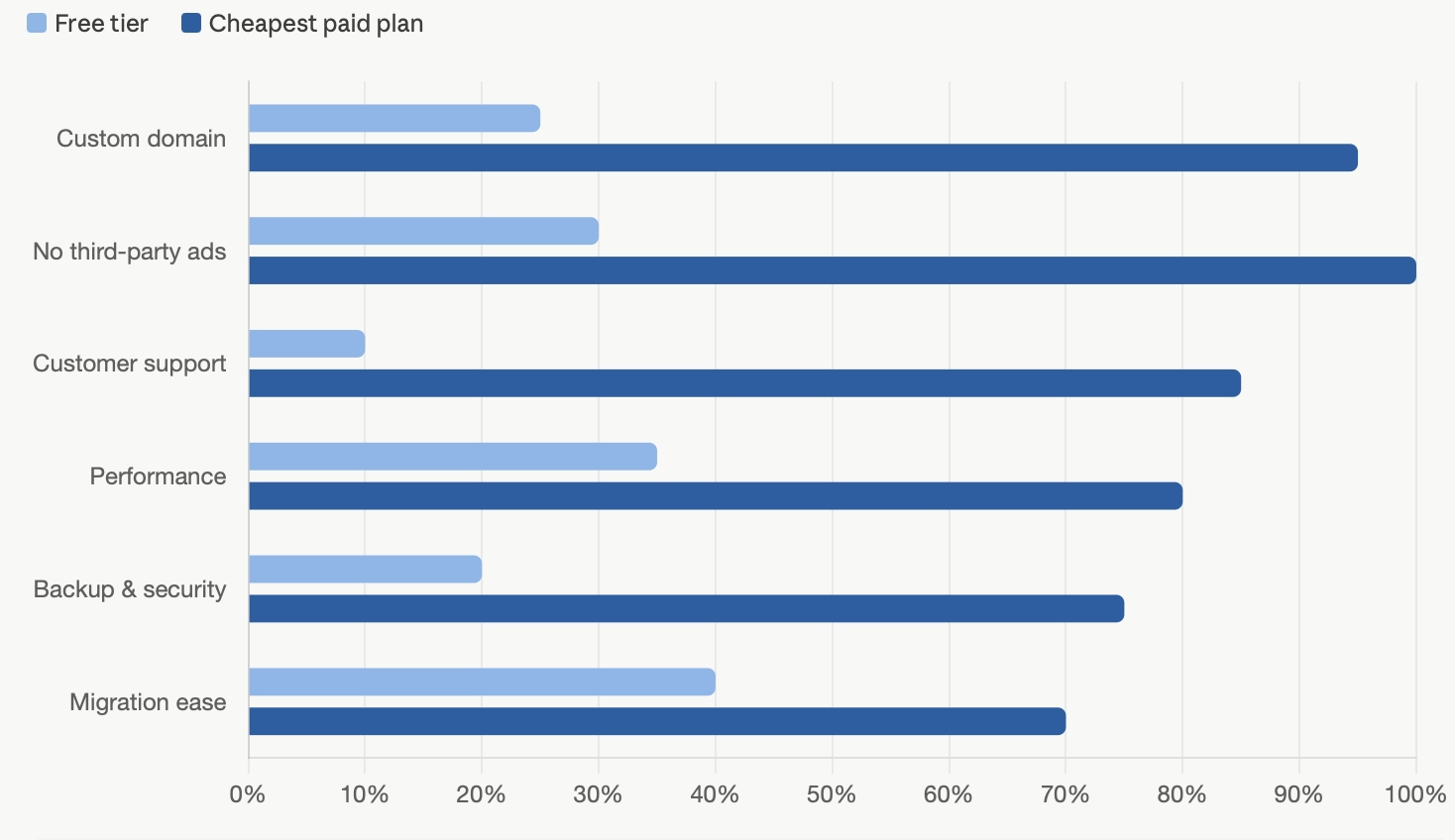
The gap between $0 and $2-4/month in hosting is the biggest quality jump in the entire hosting market. For the price of a single coffee, you get: a custom domain, no third-party ads, actual customer support, significantly better performance, automated backups, and professional credibility.
Hostinger's shared hosting starts at $1.95/month on a long-term plan. WordPress.com's Personal plan is $4/month. Even Wix's Light plan at $17/month (the cheapest ad-free option) transforms the experience completely.
If your site matters to you — if it represents your work, your business, or your professional identity — that small investment removes every significant limitation we've discussed in this article. And if you're planning to sell products or services, the gap widens further — check our eCommerce tools comparison to see which platforms bundle hosting with real selling power.
Dig Deeper: UseReviews.io Hosting Reviews
Free hosting is one slice of a much bigger decision. If you're ready to explore paid options — or just want to compare what's out there — we've done deep-dive reviews with real user feedback, honest scoring, and specific "best for / skip it if" recommendations:
→ Hosting.com Review — Speed-focused hosting with Turbo servers, 9 global data centers, and phone support. We scored it 7.8/10. Best for WordPress users who want fast performance without managed hosting prices.
→ Webflow Review — The visual builder that writes real code. Scored 8.4/10. Best for designers who understand CSS and want pixel-level control with clean code output. Free plan available for prototyping.
→ Ghost Review — The publishing platform that keeps your revenue. Scored 8.4/10. Best for bloggers, newsletter creators, and membership-driven content businesses. Self-host free or use Ghost(Pro) from $15/month.
→ Drupal Review — Enterprise-grade CMS for complex digital experiences. Best when you need bulletproof security and deep customization — and have the technical team to support it.
→ eCommerce Tools Comparison — If you're building an online store, free hosting won't cut it. Compare Shopify, BigCommerce, Wix, and more to find the right fit.
→ Find Software — Browse all our B2B software reviews across hosting, marketing automation, CRM, and more — with personalized recommendations through Find Software based on your specific business needs.
The Bottom Line
Free hosting in 2026 is better than it's ever been — if you're technical enough to use the developer-focused platforms. GitHub Pages and Cloudflare Pages offer genuinely zero-compromise static hosting. Netlify and Vercel are excellent for modern web development workflows with reasonable free tiers.
But for the website builder crowd — the non-technical users who represent the vast majority of people searching for "free website hosting" — free tiers remain what they've always been: trial versions wearing a permanent costume.
The most expensive hosting decision you'll ever make isn't the monthly fee. It's building something important on a platform you'll eventually need to leave, and discovering that leaving is the hard part.
Choose your free tier with your exit strategy in mind. Your future self will thank you.